.png)
For many organizations, moving from Microsoft to Google Workspace is framed as a productivity initiative: better collaboration, a cloud-first operating model, more flexibility for distributed teams, and often meaningful cost savings.
There’s also a generational shift at play. Many employees entering the workforce today are already familiar with Google Workspace from university settings, where Google Suite is widely used across educational institutions. For companies, it’s a natural transition, and it works best to support their employees.
These are all valid drivers, and they’re exactly why so many IT and business leaders are making the switch.
But a Microsoft to Google Workspace migration is not just a productivity project. It is also a security one.
Most migration plans focus on the obvious: moving files, transferring data, and provisioning users. The technical mechanics of email, storage, and identity get careful attention.
What rarely gets the same level of planning is SaaS security and data access governance: how applications connect, how data is shared, and how permissions are enforced once users are live in the new environment.
Google Workspace fundamentally changes how work happens. Sharing becomes easier. Third-party apps connect faster. Collaboration happens across company boundaries by default. At the same time, identity becomes the control plane for everything: who can access what, how they access it, and through which tools.
As a result, the security model shifts along with the productivity model.
Migration doesn’t just move your data, it reshapes how risk spreads.
How Google Workspace Changes Your Risk Model
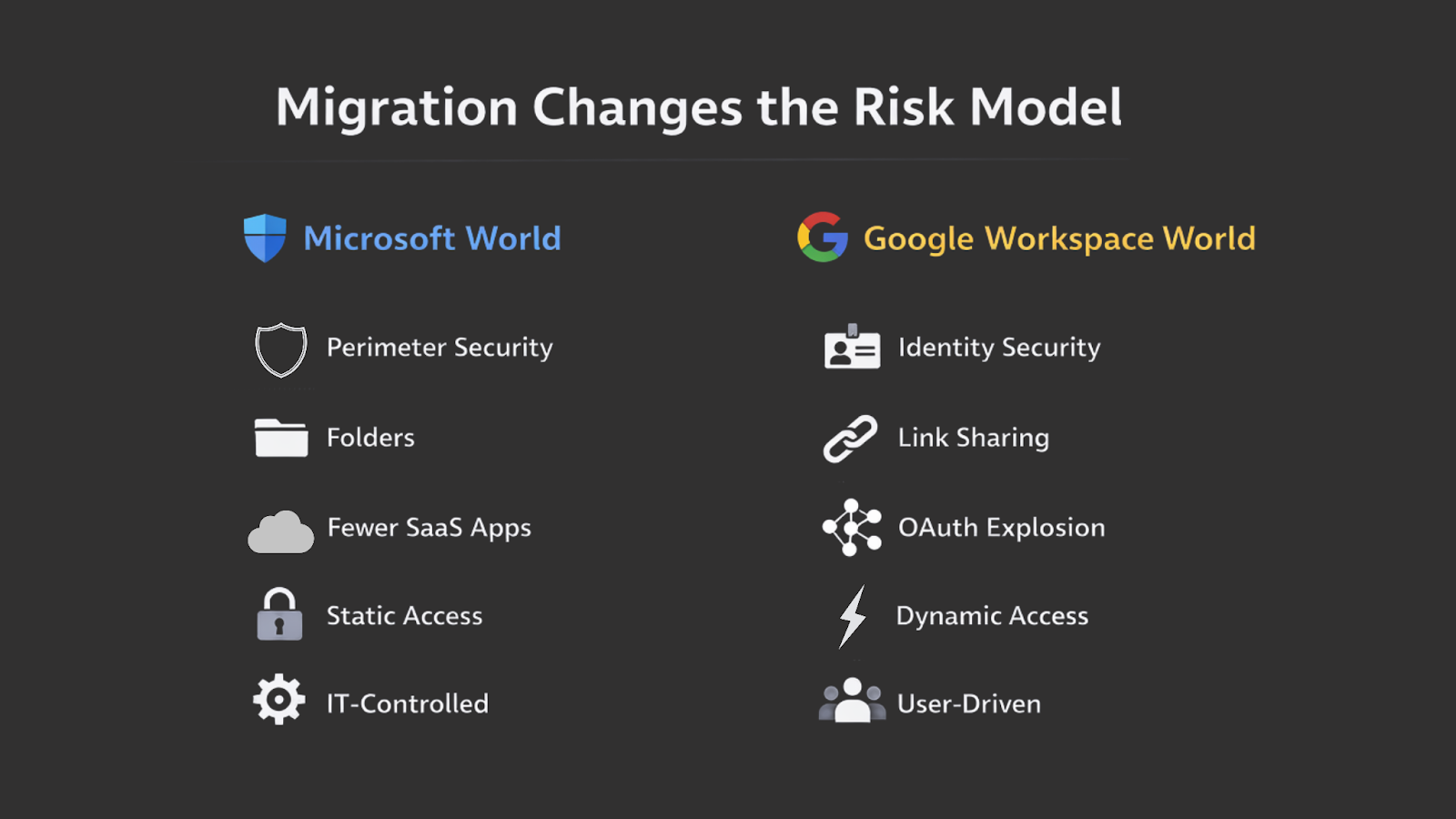
Migrating to Google Workspace doesn’t just introduce new tools, it changes the way risk enters and spreads through your organization. The platform is designed for speed and openness, which is exactly what makes it powerful. It’s also what makes governance harder if security controls aren’t put in place early.
2.1. Sharing Becomes Frictionless
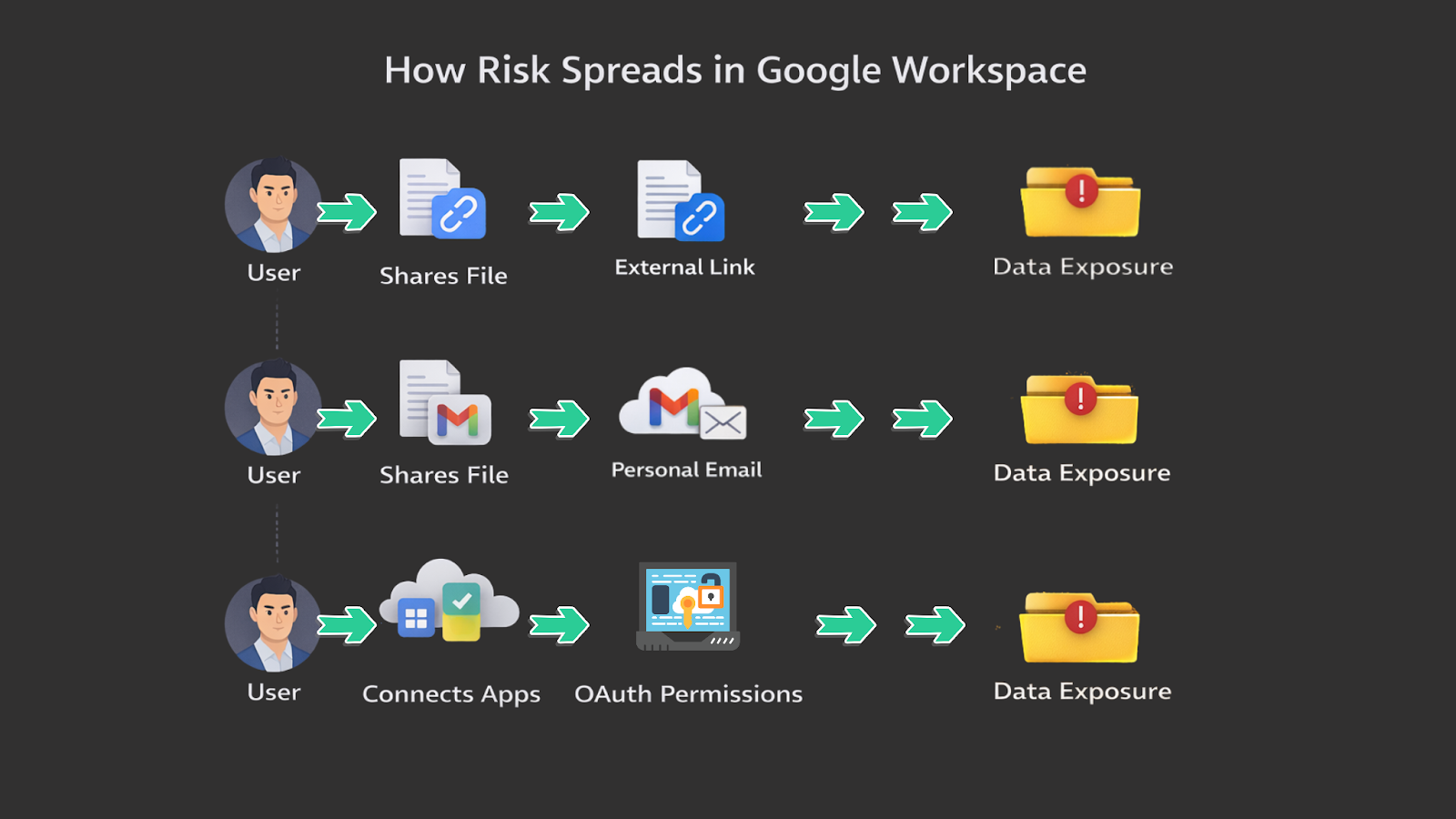
External sharing is a core feature of Google Workspace. It’s built directly into Drive, Docs, and link-based access. Sending a file to a partner or contractor is often as simple as clicking “Share” and selecting “Anyone with the link” to keep things moving.
Over time, this behavior becomes normal. Users are encouraged to collaborate quickly and without barriers, and the tools make that easy.
The intent is productivity and teamwork - but the outcome is often uncontrolled exposure. Sensitive files are shared more broadly than intended, links persist long after projects end, and visibility into who actually has access becomes impossible to track.
What begins as convenience gradually turns into sprawl. And once sharing patterns are established, they’re difficult to reverse without disrupting how teams work.
2.2. SaaS App Adoption Accelerates
Google Workspace also acts as a gateway to the broader SaaS ecosystem. As soon as users are onboarded, they start connecting tools that make their jobs easier: CRMs, project management platforms, AI tools, marketing applications...the list goes on.
These integrations happen through OAuth with a simple click of a ‘Connect with Google’ button. This allows all these third-party apps to request access to mailboxes, files, calendars, and contacts in just a few seconds.
From a user’s perspective, this is convenient. For IT and security teams, it creates a very different reality.
Each new OAuth connection introduces potential risk, yet there’s no swift, risk-informed way to evaluate or control these applications as they enter the environment.
While third-party OAuth app access logs are available in the Google Workspace Admin Console, they offer visibility - not governance. There is no built-in capability to risk score apps, categorize them by sensitivity, apply AI-driven analysis, or automatically remediate risky or overpermissioned access.
Security leaders cannot easily flag suspicious applications for deeper review, enforce predefined policies, or trigger automated remediation workflows based on risk level. Unless there is a constant, rigorous audit of these logs, these apps fly under the radar (and usually do).
2.3. Identity Becomes the Control Plane
In a Google Workspace environment, there is no longer a traditional network perimeter. Access is no longer determined by where a user is located, but by who they are and which applications they are allowed to use.
In practice, this means access = identity + application permissions.
Every user account becomes a gateway to multiple SaaS platforms. Every connected app introduces its own permission model. And every misconfigured setting - whether it’s an over-privileged integration or a broadly shared folder - becomes a potential breach vector.
Instead of defending a single boundary, security teams are now responsible for governing thousands of micro-access decisions across users, files, and apps.
The challenge is not just stopping malicious actors from getting in, but preventing well-intentioned employees from creating risk through everyday collaboration and user behavior.
2.4. AI Magnifies Existing Access Problems
With the introduction of Gemini into Google Workspace, access issues don’t just persist - they become more visible and more dangerous.
Gemini is designed to be helpful by drawing from the data users already have access to across Gmail, Drive, Docs, and other Workspace services. That means its responses are only as safe as the underlying permission structure already in place.
If access controls are not cleaned up during migration, Gemini can surface information to users that they were never intended to see. Old sharing links, overly broad group permissions, and forgotten folders suddenly become part of an AI-powered data center.
What was previously hidden in a maze of files can now be summarized, searched, and delivered in seconds.
This creates a new type of risk: not data leakage through external attackers, but internal overexposure through unchecked access permissions. Employees may receive insights from contracts, HR documents, or financial files simply because those resources were technically accessible - even if that access was accidental or outdated.
Gemini doesn’t create new permissions. It amplifies existing ones. And in a newly migrated environment, where access has not yet been fully audited or normalized, that amplification can expose weaknesses immediately. Without early governance over who can access what, AI becomes a force multiplier for misconfiguration rather than a productivity tool.
In this model, managing permissions is no longer just about compliance or least privilege. It is about ensuring that automation and AI operate within clearly defined boundaries from day one.
This is the new risk model of Google Workspace: highly distributed, behavior-driven, and deeply tied to how people work. Without visibility and control at the SaaS layer, organizations are left reacting to exposure rather than preventing it.
The Blind Spot in Most Migrations: SaaS Security
Despite the scale and complexity of most migrations, SaaS security is often treated as a secondary concern, or postponed entirely. The focus stays on getting users live and keeping business running, while access governance and sharing controls are assumed to be “good enough” out of the box.
In practice, this creates a gap between how Google Workspace is designed to be used and how organizations actually manage risk.
3.1. Native Admin Controls Aren’t Enough
Google Workspace provides strong administrative tools for managing domains, users, and high-level policies. These controls are essential, but they are not designed to govern how employees use SaaS applications day to day. They offer limited visibility into third-party app permissions, ongoing sharing behavior, and how access evolves over time.
3.2. Google DLP Doesn’t Solve Behavior
Google offers two primary native data protection products that most organizations rely on.
The first is Google’s GCP-native Cloud DLP API, now referred to as Sensitive Data Protection. This tool is primarily designed to detect and classify sensitive data across environments.
The second is Chrome Enterprise Premium with Data Loss Prevention, which focuses on monitoring and controlling browser-based activity - particularly downloads, uploads, and other actions that could lead to data exfiltration.
Together, these solutions provide a solid foundation for identifying sensitive data and tracking risky browser behavior. However, organizations that rely solely on Google’s native DLP capabilities still encounter challenges when it comes to managing the nuances of real-world data sharing.
Despite their strengths, Google’s native DLP capabilities have limitations around context awareness, policy automation, and remediation. For example:
- DLP rules are largely pattern-based and lack contextual intelligence. This often results in simple “block” or “allow” decisions, which can hinder business productivity.
- Policy updates may not take effect quickly enough, meaning data can potentially be exfiltrated before a risky event is fully detected or enforced by Google’s native security.
- There is no built-in remediation or automatic remediation at the user level, requiring manual intervention for IT or security teams if an incident happens.
While Google provides a strong baseline for data loss prevention, additional controls and tooling are often necessary to achieve comprehensive data access governance and compliance within Google Workspace environments.
3.3. Migration Is When Risk Multiplies Fastest
Risk increases fastest at the exact moment migration is underway. New tools are introduced, new habits form, and new data flows are established across teams and partners. At the same time, there is no historical baseline for what “normal” looks like in the new environment.
This is why SaaS security cannot be an afterthought in migration. It must be built into the transition itself, not layered on once exposure has already occurred.
What a Secure Migration Should Actually Include
A secure Google Workspace migration is not defined by how smoothly data moves from one platform to another. It is defined by how well access and sharing are controlled once users begin working in the new environment. That requires three core capabilities: visibility, control, and governance that can keep pace with growth.
4.1. Know What’s Being Migrated Over
Before anything moves, organizations need to understand exactly what they are bringing with them.
When a file is migrated from Microsoft to Google Workspace, its access model often comes with it. That includes external sharing permissions, legacy group access, and links that may no longer be appropriate. The critical question is: do you know what exposure is being carried over, and whether it’s still valid?
Many organizations focus on moving data quickly, but don’t assess whether the access tied to that data should follow. As a result, outdated permissions, unnecessary external access, and years of accumulated sharing decisions become part of the new environment from day one.
A secure migration starts by identifying what actually needs to move, and what shouldn’t. That means understanding which files are externally shared, who has access to them, and whether those permissions still align with business needs. From there, teams can migrate what’s necessary and begin setting up workflows that govern access going forward.
The goal is to avoid importing exposure debt and then spending months trying to clean it up. Instead, organizations start with a more intentional foundation and control how access evolves over time.
4.2. Visibility From Day One
Once migration begins, security teams need immediate insight into what is happening inside the new SaaS environment. That starts with understanding which applications are connected, what permissions those applications have been granted, and where data is being shared externally.
Without this visibility, risk is impossible to measure. App sprawl, excessive permissions, and unintended exposure all develop quietly. By the time they are discovered, they are already embedded into daily workflows.
A secure migration establishes this baseline from the start, ensuring that access decisions are visible and auditable as soon as users begin collaborating in Google Workspace. With that visibility in place, teams can put the right controls and workflows around access early - so governance scales with usage and exposure debt never has the chance to build again.
4.3. Control Over High-Risk Actions
Visibility only matters if teams can act on what they see.
As users begin working in Google Workspace, security teams need the ability to restrict over-privileged applications, define clear rules for how sensitive data can be shared, and enforce least-privilege access across users and tools. Without that layer of control, risky access patterns can form quickly and become part of everyday operations.
This does not mean blocking collaboration. It means placing practical guardrails around the actions that introduce the most risk. When something drifts from policy - like excessive permissions, unnecessary external sharing, or high-risk app access - it should be corrected early through guided remediation and consistent enforcement.
With the right controls in place from the start, organizations can allow teams to work freely while preventing high-impact mistakes by design, keeping access aligned as the environment continues to grow.
Why You Should Use DoControl from the Start
Migration is one of the few moments when organizations can reset how access and sharing work. Using DoControl from the beginning turns that moment into control instead of cleanup. The goal is simple: don’t migrate exposure, don’t create bad habits, and don’t let risk scale faster than governance.
Reason #1: Clean Up Exposure Before You Carry It Forward
Migration does not eliminate existing risk. It transfers it.
If data is already overshared in Microsoft, those permissions and exposures will move into Google Workspace unless they are addressed first. DoControl can integrate with Microsoft environments before migration to identify what data is exposed, who has excessive access, and where sharing has drifted from policy.
We can then start to run remediations - so that the environment is clean when it eventually gets migrated over. Once it’s migrated, we set up automated workflows that govern and control exposure for the future.
This process allows organizations to remediate risk before it becomes the foundation of the new environment. Instead of importing years of access debt, teams can start Google Workspace with a clean slate, and ensure that the same exposure does not rebuild over time with the help of our automated controls.
Migration becomes a reset point, not a copy of old mistakes.
Reason #2: Shape Sharing Behavior Before It Becomes Culture
The first weeks after migration really define how employees adapt to the new tech stack and learn to collaborate. Those behaviors quickly become habits.
Without automated workflows being set from the jump, users overshare, bypass approvals, and normalize convenience over control. Once that culture forms, reversing it requires heavy retraining and large-scale permission cleanup.
DoControl allows security teams to engage users immediately through structured sharing workflows and policy-based approvals. Secure behavior is built-in to the way people request access and share data, rather than enforced later through audits, training, or pleas from security teams.
Security works best when it is invisible, early, and baked in from the start - setting an automatic ‘normal’ for employees in how they use Google Workspace.
Reason #3: Data and Sharing Will Grow Fast - Be Proactive
Migration accelerates file creation, external sharing, and app integrations. Risk grows with it, and it does not grow linearly. Each new user, file, and app introduces more access paths and more opportunity for exposure.
When organizations wait to govern this growth, they inherit chaos - the damage is already done.
With DoControl in place from the start, teams establish a security baseline before scale takes hold. Risky patterns are prevented before they spread. Security teams are engaged with every-day events from the getgo. SaaS sprawl is controlled while it is still manageable. Workflows and enforcement are active as soon as the new environment is live.
After all, it’s easier to guide a security program as it grows than to clean up after it fails.
Reason #4: Ensure Configuration Aligns With Compliance Standards
Misconfiguration is one of the most common causes of SaaS security incidents. Broad sharing, excessive permissions, and ungoverned app access can quickly put organizations out of alignment with internal policy and regulatory requirements.
Migration introduces new defaults and new access decisions. If those decisions are not governed, compliance gaps are built into the environment from day one.
DoControl helps enforce compliance standards, align with industry baselines, and maintain consistent data use policies as part of daily operations. Configuration drift is corrected automatically, around the clock, from the start.
This shifts compliance from periodic audits to continuous, ongoing control. Access is reviewed, corrected, and enforced in real time with DoControl, rather than retroactively by security team members who have other pressing issues to attend to.
Reason #5: Gemini Requires Strong Access Controls
Gemini surfaces information based on existing permissions. If access is overly broad or outdated during a migration, Gemini can expose sensitive data to users who were never meant to see it.
Gemini AI does not necessarily create new risk - but it seriously amplifies existing mistakes with existing permissions.
Deploying DoControl from the start ensures that data access is governed before Gemini is introduced and adopted by the organization at scale. Permissions reflect real business needs. They align with zero-trust data policies. The confidential data stored in Google Workspace remains protected and only seen by those who absolutely need it.
When automation operates within defined security parameters, it allows your organization to adopt AI with confidence instead of hesitation.
DoControl gives you control over access and sharing before risk takes hold. Using DoControl at the beginning of a Microsoft-to-Google Workspace migration ensures that your Google Workspace environment is protected from the jump.
After all, migration is when patterns form. Starting with DoControl ensures those patterns are secure by design, not corrected by cleanup.
Conclusion
Migration is a one-time event. SaaS security is ongoing.
Once the move to Google Workspace is complete, the environment continues to change every day. Data keeps growing. New apps are adopted. External sharing expands. Compliance obligations remain. None of these stop when the migration project ends.
That’s why security can’t be treated as a temporary layer added for the transition. Google Workspace is a long-term platform, and the way access and sharing are governed must match that lifecycle. Without continuous control, risk accumulates quietly as usage evolves.
If Google Workspace is your new operating system, SaaS security needs to be baked in from the start.
Migration has a finish line. SaaS risk does not.

.png)