Misconfigurations don’t fail like code fails. They fail like gravity works: always on, always pulling, and always working against you.
One day, a Google Drive sharing policy is tightened for an audit.
Two weeks later, a well-meaning admin enables a setting “temporarily.”
A quarter later, a new team spins up a third-party app integration to hit a deadline.
Six months later, you’re staring at the same exposure pattern you swore you fixed - except now, it’s spread across more apps, more users, more data, and more exceptions.
That’s configuration drift: the slow, constant deviation from your intended security posture.
In SaaS, it’s not an edge case - it’s the default operating mode. Drift happens because SaaS is living software: admins change settings, users connect apps, vendors ship updates, organizational units get restructured, and policy decisions get made under pressure.
Drift is risky, because it quietly reintroduces exposure and compliance gaps over time.
Most “posture” tools stop at detection. They surface findings, create alerts, open tickets… and then they stop.
But, drift doesn’t stop. So, remediation can’t stop either.
This is where DoControl’s “connecting tissue” comes in: the system that links detection to action, continuously - turning security intent into an always-on enforcement loop.
Three things must be true to actually beat drift
1) Drift must be detected everywhere, not just where APIs are convenient
DoControl’s misconfiguration management evaluates SaaS posture across hundreds of security controls, and aligns checks to standards and frameworks - then, supports automated remediation workflows triggered by misconfiguration events in real time.
But here’s the hard truth: not every meaningful security change is reliably trackable through a single “configuration API.” Some of the most important signals live in audit logs - especially for admin actions, OAuth activity, and changes that occur in different control planes.
Google’s audit logging ecosystem is a great example of this: Admin Audit logs record actions in the Admin console, while other changes (like certain Group setting changes outside the Admin console) can surface in different audit streams (Google Cloud Documentation).
2) Drift must trigger a workflow, not a notification
DoControl is built as an agentless, event-driven platform with granular, no-code workflows designed to remediate risks automatically over time, not just report on them.
A workflow is not “send an alert.” A workflow is policy logic + routing + approvals + remediation steps, executed consistently without fail.
3) The loop must be closed (detect → decide → fix → verify → evidence)
Closed-loop enforcement is the difference between knowing you have drift and ensuring drift doesn’t persist.
DoControl’s workflow engine becomes the connective layer across:
- Misconfiguration detection
- Event telemetry (including audit logs)
- Data context (file sensitivity, ownership, exposure)
- Remediation actions (API-driven enforcement)
- Verification and auditability
How it works under the hood: step-by-step
Step 1: Establish desired posture (baseline + control mapping)
DoControl evaluates your SaaS configuration posture and maps findings by app, domain, and impact. It also ties checks to standards (ex: CIS-aligned guidance) so posture isn’t subjective.
Step 2: Continuous telemetry collection (APIs + audit logs)
DoControl ingests changes from SaaS sources and maintains an inventory of assets, users, groups, and OAuth apps-updated with each SaaS event.
This matters because some “drift” is best observed as an event:
- Admin changes (security settings, application settings)
- OAuth token grants / connected apps
- Group membership and group-level settings
Step 3: Drift detection + context enrichment
When a control deviates, DoControl doesn’t just flag “setting changed.” It attaches:
- Who changed it (actor)
- What changed (old → new)
- What it affects (entities, scope, data exposure)
- Why it matters (risk + compliance context)
Step 4: Controlled remediation (with approvals when needed)
Workflows can enforce:
- Fully automatic remediation for high-confidence policies
- Approval-gated remediation for sensitive environments
- End-user interaction patterns (educate + enforce)
Step 5: Verification + audit-ready evidence
The workflow confirms the system has returned to a compliant state and produces a durable record of what happened, when, and why.
Three real-world drift workflows:
Example 1: Public file-sharing in Google Drive
The misconfiguration
A file containing sensitive business context becomes “Anyone with the link,” or is shared externally beyond policy.
What drift occurred
A user changes a file’s sharing state (or a link-sharing policy effectively exposes it).
Why it’s risky
Link-sharing and uncontrolled external sharing are a repeat offender in SaaS incidents: easy to create, hard to track manually, and often forgotten about.
How DoControl detects it
DoControl continuously monitors exposure and sharing posture, identifying public/external exposure patterns and the impacted assets.
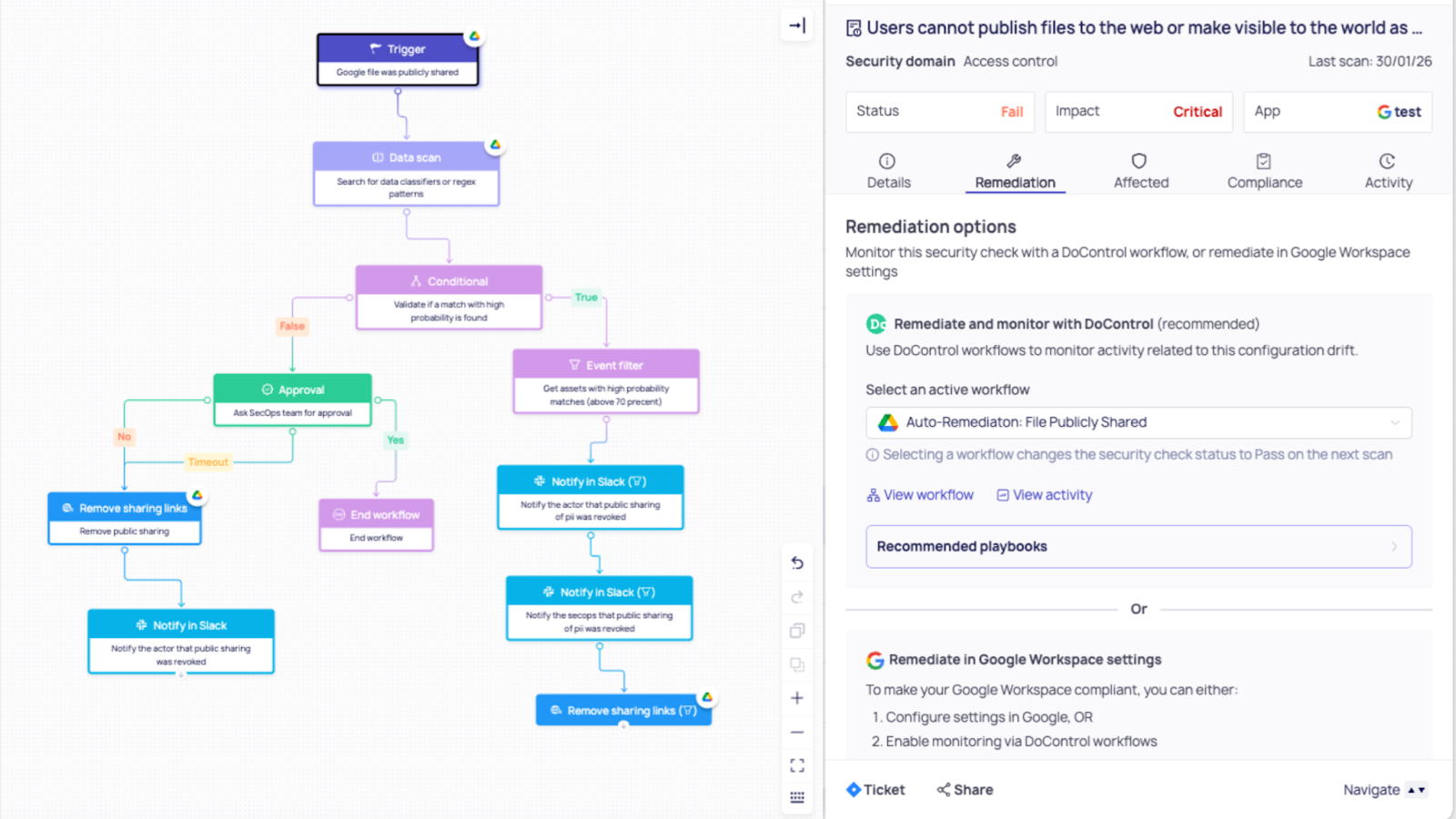
Workflow triggered: Drift → Workflow
- Notify the file owner and security with full context (file, path, sharing state, collaborators)
- If the file meets a “high sensitivity” threshold (label, keyword match, or location), require security approval before enforcement
- Otherwise, proceed automatically
Remediation: Workflow → Fix
- Revoke public link / remove external sharing
- Optionally move the file to an approved shared drive or re-share to an approved internal group
(DoControl’s remediation workflows include actions like revoking public sharing links and removing unauthorized collaborators.)
Outcome
- No noisy alert that dies in a queue
- Immediate reduction in real exposure
- A consistent policy outcome, every time
- Clean evidence trail for audits
————————————————————————————————————————————————————————————
Example 2: OAuth “permission creep” from a third-party app (Shadow apps)
The misconfiguration
A third-party app gains access to Google Workspace data via OAuth, either newly authorized by a user, or expanded permissions over time.
What drift occurred
- A user authorizes an unvetted app
- Or, an app’s access profile changes (new scopes, broader access)
Why it’s risky
OAuth apps can become stealthy access paths into Drive/Gmail/Calendar data, especially if they’re over-permissioned, dormant-but-still-authorized, or outside governance. Google explicitly frames OAuth scope control as a key admin mechanism.
How DoControl detects it
DoControl inventories third-party OAuth apps and activity events as part of its event-driven platform model. In Google’s ecosystem, OAuth Token Audit logs track third-party app authorization activity.
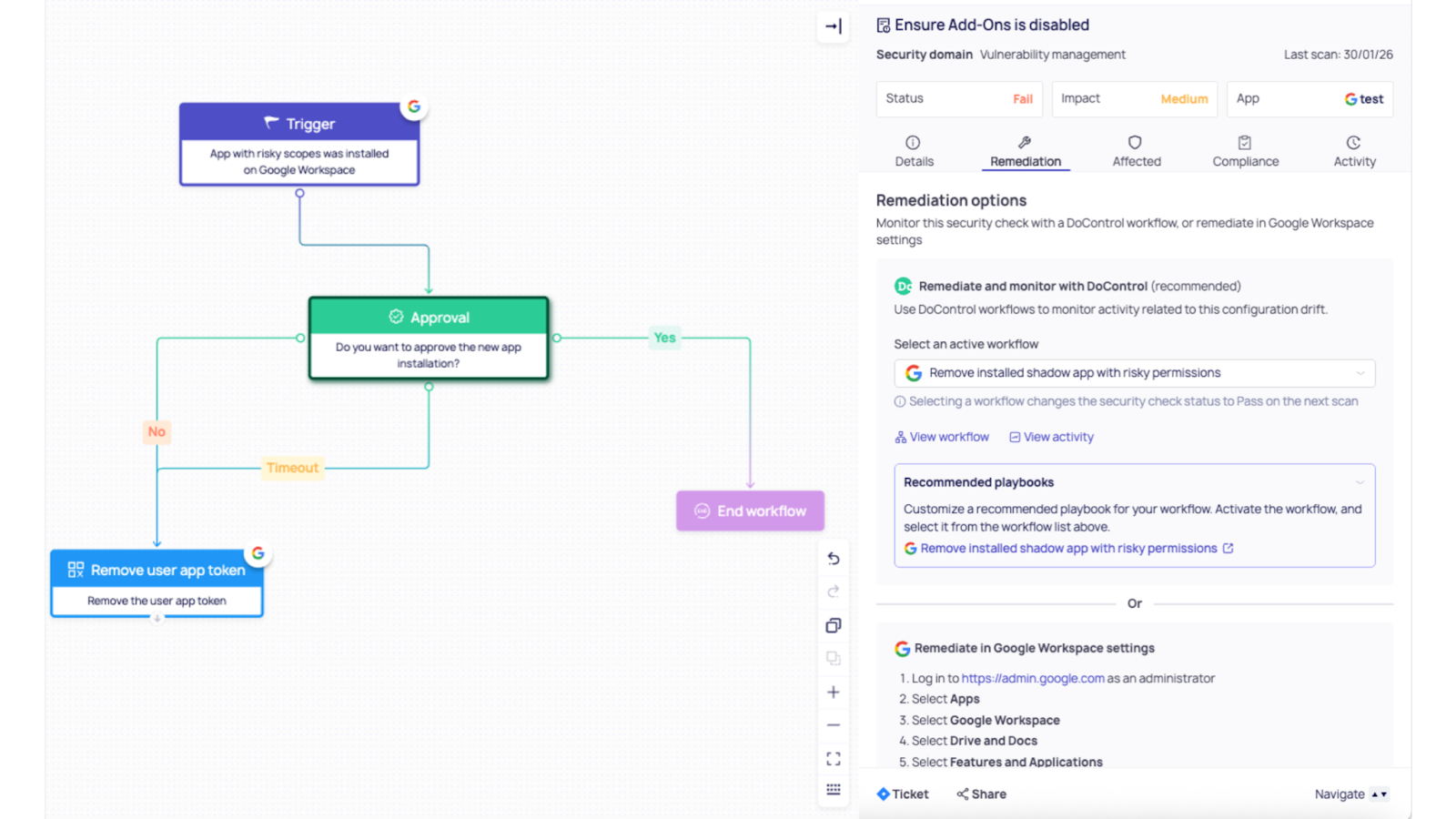
Workflow triggered: Drift → Workflow
- If app is unverified and requests high-risk scopes (ex: broad Drive access), auto-escalate to security
- If app is in an allowlist, log and continue
- If app is outside policy, initiate containment
Remediation: Workflow → Fix
- Revoke third-party OAuth access at scale (DoControl explicitly supports revoking third-party OAuth access via workflows)
- Optionally block the app / restrict its access level using Admin console controls (Trusted/Limited/Blocked or scope-based controls)
- Notify the user with a clear reason + approved alternatives
Outcome
- Third-party access is governed, not discovered after the fact
- Permission creep becomes a controlled event, not a silent drift
- Security teams stop playing “OAuth whack-a-mole”
————————————————————————————————————————————————————————————
Example 3: SharePoint Online external sharing drifts to “Anyone” links (CIS 7.2.3)
The misconfiguration
Your tenant-level SharePoint external sharing gets set to Anyone, enabling unauthenticated “Anyone with the link” access for files/folders.
What drift occurred
- A SharePoint admin (or a delegated change) moves org-level sharing from New and existing guests → Anyone (often to “unblock” a single business scenario)
- The CIS control flags this as drifting into a more permissive state
Why it’s risky
“Anyone” links are the easiest to share and can be forwarded and opened without authentication, which increases the likelihood of accidental exposure - especially when users forget to change link type while sharing sensitive docs (Microsoft Learn).
How DoControl detects it
DoControl continuously evaluates SharePoint misconfig posture and detects a drift event when the tenant’s external sharing capability changes to a more permissive setting than your baseline/CIS target. It also enriches the event with who changed it, when, and which settings were affected - so the workflow has full context.
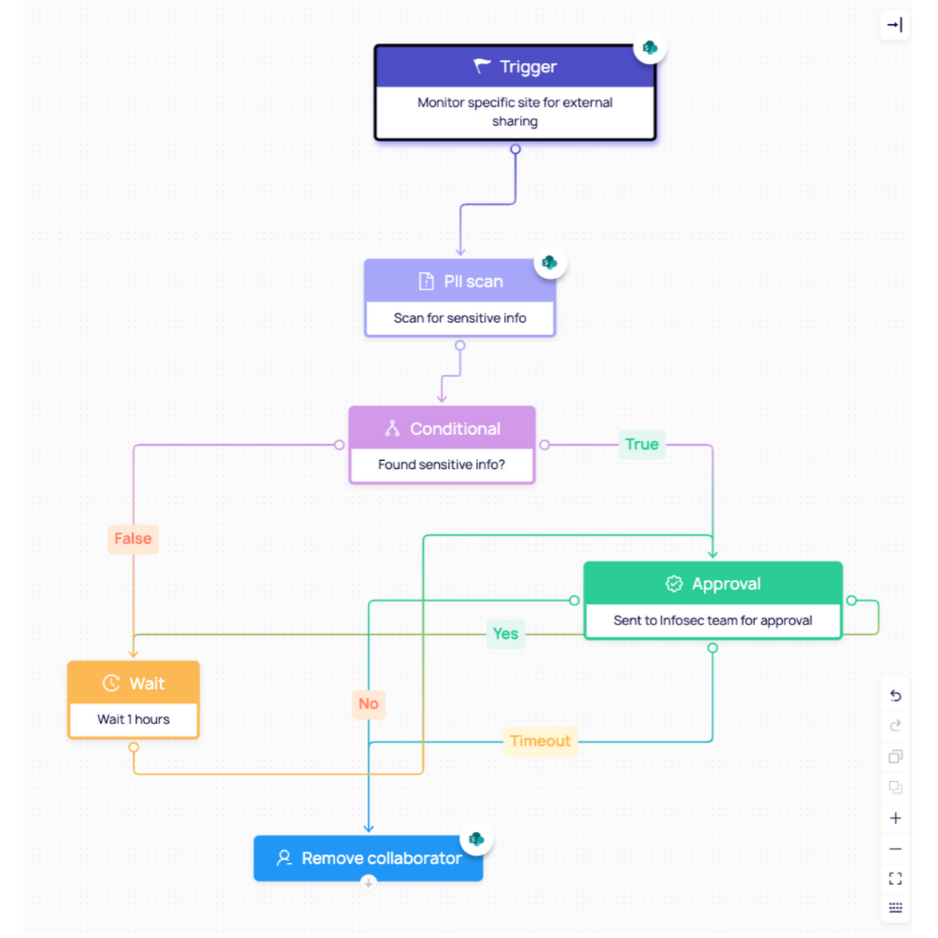
Workflow triggered: Drift → Workflow → Fix
Remember, the workflow logic is (policy + approvals + remediation)
- Trigger: “External content sharing”
- Condition: If the change was made outside an approved change window / no exception exists → enforce automatically
- Approval gate (optional): If a named set of “collaboration-heavy” sites exists, route to SecOps + SharePoint Admin for approval before enforcing (but still set guardrails like expiration)
Who’s notified
- SharePoint Admin / M365 Admin
- Security / GRC owner (because this is a benchmark control drift)
Remediation (automatic)
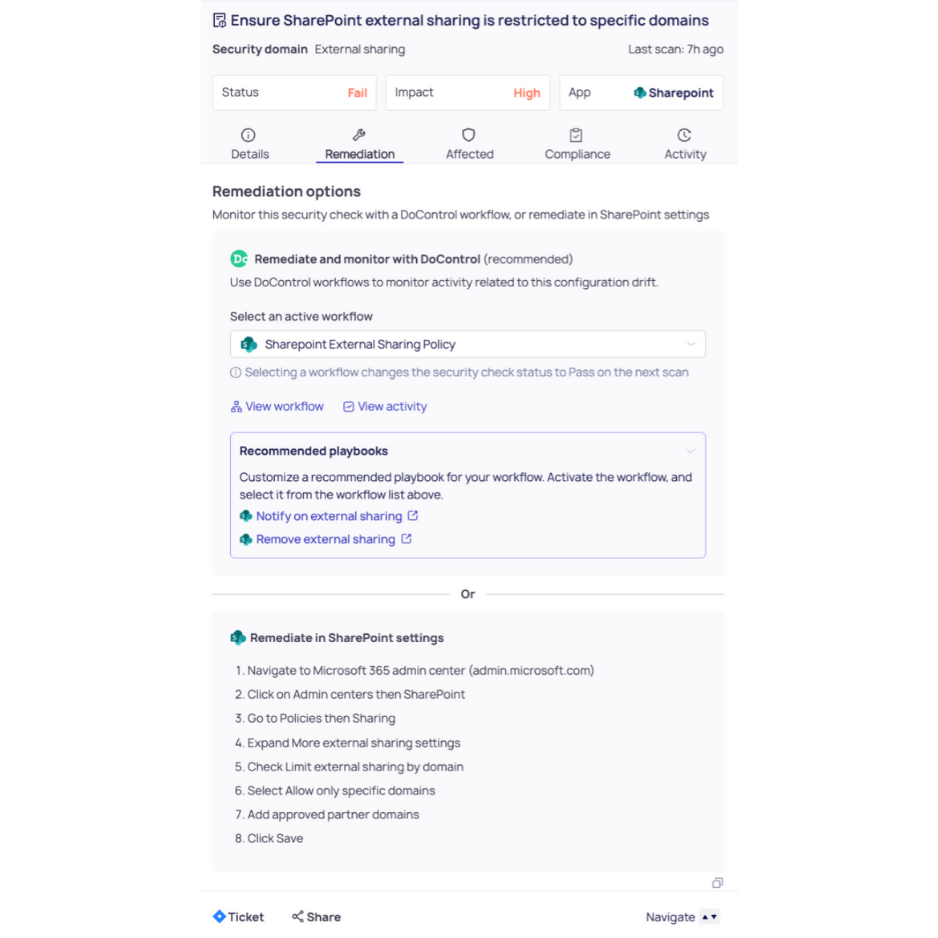
- Revert org-level sharing to the CIS-recommended level: set SharePoint to New and existing guests (or more restrictive).
- Hardening guardrails (optional but common):
- Change the default sharing link type away from “Anyone” so users must consciously opt into riskier sharing.
- If “Anyone” links are allowed for specific sites, require expiration and tighter permissions.
Outcome
- No dead-end alerts - the control returns to compliance automatically
- Reduced accidental exposure by removing unauthenticated sharing pathways
- Audit-ready evidence: the drift, approval (if needed), remediation, and verified post-state are all recorded (closed loop)
Why this matters strategically: from “security intent” to “security system”
This isn’t “automation” as a nice-to-have. It’s the shift from:
Security as a backlog → to → Security as a living control system
When detection is connected to enforcement:
- Drift becomes self-correcting
- Security teams eliminate bottlenecks and alert fatigue
- Policies scale across millions of assets without adding headcount
- Compliance becomes continuously true, not periodically asserted
DoControl’s posture + workflow model is designed for this exact reality: SaaS environments change constantly, so security must operate continuously through real-time, policy-based workflows that detect, respond, and remediate with minimal manual effort.
A forward-looking note
The market is moving toward “agentic” systems tools that don’t just observe risk, but reliably act on it. Drift is the perfect proving ground for that future because it’s measurable, repeatable, and operationally painful.
Our direction is clear:
- Expand event coverage (more audit streams, more SaaS control planes)
- Make workflows safer (better approvals, guardrails, and exception handling)
- Make remediation more adaptive (context-aware actions based on data sensitivity and business intent)
Because in the end, the goal isn’t to detect drift faster. It’s to make drift irrelevant by turning your security policies into an always-on system you can trust.


.png)