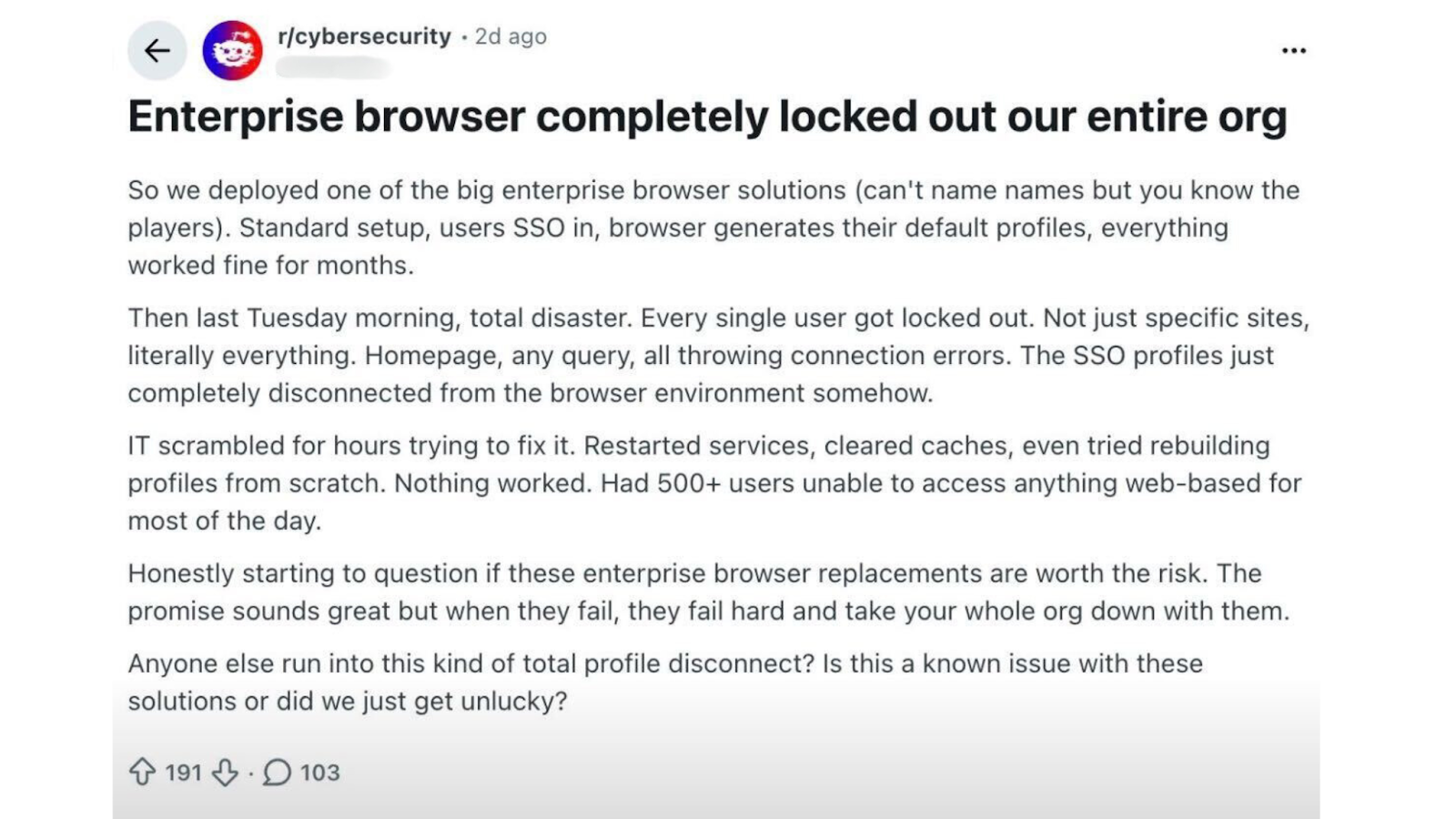
A recent Reddit thread perfectly captured a challenge we hear from security teams every week: enterprise browsers were supposed to simplify security - so why do they often create more headaches than they solve?
The intention behind enterprise browsers is sound. They aim to standardize and centralize data controls at the point where users interact with information and systems. But in practice, they introduce new operational overhead, and still leave organizations exposed in areas where precision and context really matter.
We’re seeing a clear pattern: enterprise browsers are useful, but their rigidity prevents them from being a standalone DLP or data security solution.
When misapplied, they increase security blind spots and business friction.
Let’s break down why.
Enterprise Browsers 101
At their core, enterprise browsers function as enhanced browser plug-ins, historically used for straightforward controls such as:
- Ad-blocking
- Preventing phishing
- Blocking certain websites
Over time, they evolved to take on heavier security functions, particularly around data loss prevention (DLP). Today, one of the most common use cases is attempting to control what users copy and paste from corporate SaaS platforms into external systems - including AI tools.
Because browsers sit closest to where users interact with data, they can intercept and control certain actions uniquely well. But that advantage has limits.
Why Enterprise Browsers Fall Short for DLP
Enterprise browsers absolutely have a place - especially for controls that only a browser can perform: copy/paste monitoring, website blocking, extension governance, and more.
But when organizations try to stretch enterprise browsers into full data security solutions - especially for SaaS - they run into several issues:
1. Rigid, agent-style policies
Most enterprise browsers mirror the traditional agent-based DLP model:
scan → block → alert.
This binary approach lacks user, identity, and behavioral context - meaning they frequently:
- Block legitimate sharing that users should be able to do
- Miss risky sharing behavior that should be reviewed or mitigated
2. Poor BYOD visibility
Enterprise browsers can only see what happens inside their controlled browser environment.
If a user logs into corporate SaaS from:
- A personal laptop
- A personal Chrome profile
- A mobile browser
…much of that activity is completely missed. That is a massive gap for modern, distributed workforces.
3. Application interference
Browser-level controls can break normal SaaS workflow patterns.
Users see:
- Buttons that don’t function
- Upload or download flows that fail
- Authentication errors
- General inconsistency with how SaaS apps are designed to work
This frustrates users, slows down productivity, and - ironically - forces them to seek workarounds, increasing shadow IT risk.
The end result is a lose-lose scenario:
Security is frustrated. Users are blocked. And the business absorbs the operational cost.
5. The Importance of Flexible, Granular Controls
Modern SaaS data security requires far more nuance than simple “allow” or “deny.”
Organizations need intelligent controls that account for:
✔ Identity, user, and behavioral context
- Is the user an admin, an executive?
- Are they downloading more data than usual?
- Are they about to leave the company?
✔ Data classification and risk scoring
- What type of data is being accessed?
- How sensitive is it?
✔ Conditional or dynamic policies
“Allow this action only if the user is in this group and the collaborator is internal.”
“Block only when data is being shared externally to personal email accounts.”
Enterprise browsers typically cannot evaluate this full set of signals. And without these dimensions, security becomes:
- Too weak, because high-risk activity goes unnoticed
- Too strict, because low-risk, legitimate work gets blocked
Either outcome is unacceptable in a modern SaaS-driven environment.
6. SaaS Data Security + Enterprise Browsers: A Best-of-Breed Partnership
As we outlined in our 2025 DLP Report, one size simply does not fit all when it comes to data loss prevention.
Enterprise browsers bring valuable device-level and browser-specific controls. But SaaS data security platforms like DoControl provide the missing context:
- Identity and behavioral intelligence
- File-level and record-level insights
- Granular activity monitoring across all SaaS apps
- Accurate remediation based on risk, not just rules
Together, they create a powerful joint control plane.
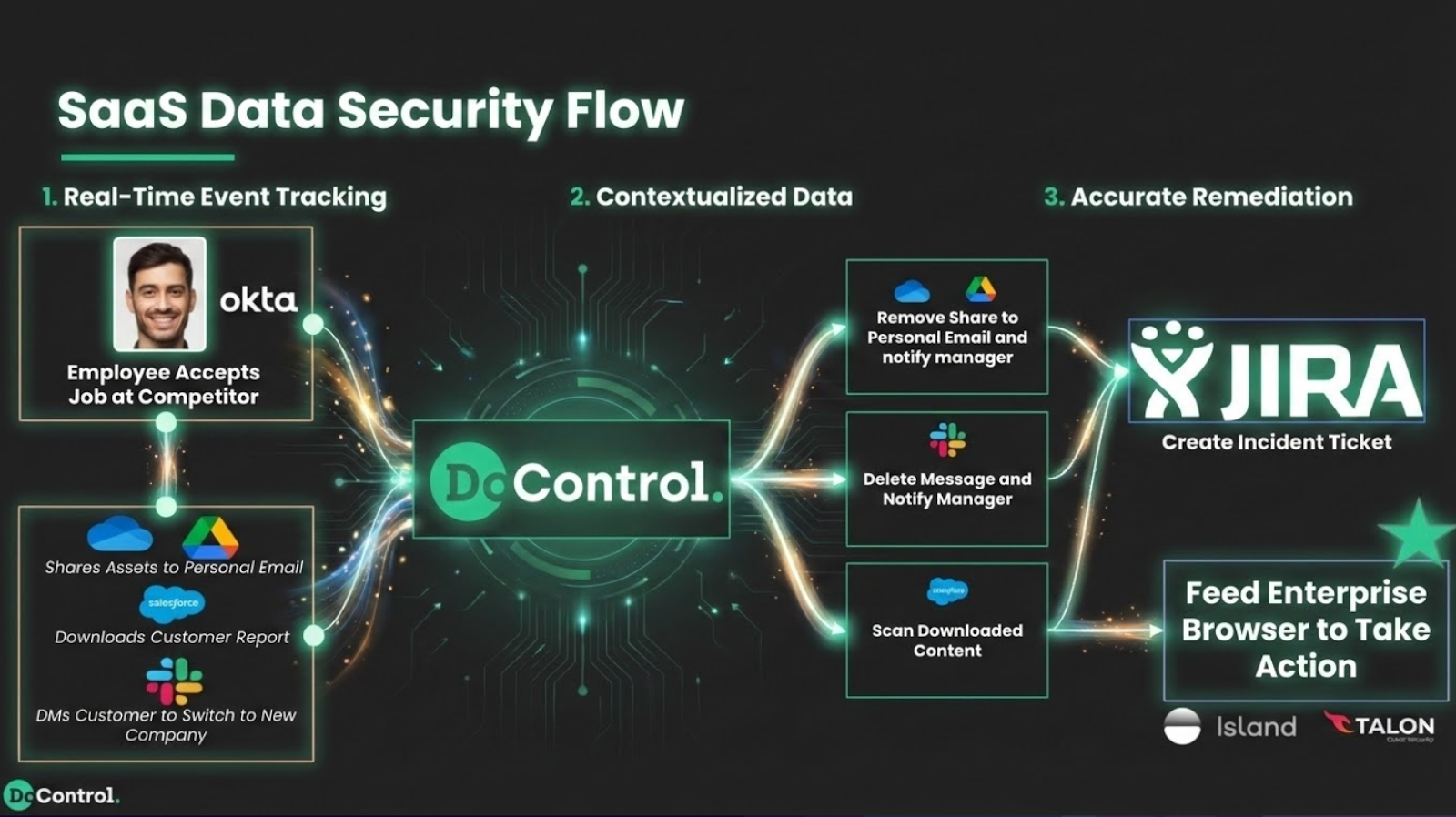
How they work in harmony:
Imagine a user who is scheduled to leave the company next week suddenly downloads several sensitive documents:
- DoControl detects this anomalous activity, understands the user’s context, classifies the data, and flags it as high risk.
- DoControl then notifies the enterprise browser with a precise, contextual instruction.
- The enterprise browser remediates at the device level - blocking a download, disabling file exfiltration, or forcing read-only mode.
Each platform performs at its strength, without interfering with normal business workflows.
This is the future of operationally efficient, context-driven data security.
Conclusion
Enterprise browsers have an important role in the enterprise security stack. But expecting them to serve as a complete DLP/data security solution sets them up to fail.
The path forward is pairing enterprise browsers with a SaaS data security platform like DoControl - so you can:
- Apply precise, context-aware policies
- Detect and remediate real risk in real time
- Reduce friction for users
- Scale securely without slowing down the business
If you're currently relying on an enterprise browser alone, or evaluating whether it’s enough for your needs, we strongly recommend running a POV with DoControl integrated with your browser solution. You’ll quickly see the synergy - and the previously hidden gaps - and how seamlessly a contextual SaaS security layer closes them.
{{cta-1}}


.png)