.png)
.png)
Over the last decade, the way businesses operate has completely transformed. Teams no longer rely on a few centralized systems - instead, they collaborate across a vast network of SaaS applications.
Sensitive data now moves fluidly between tools, users, and even organizations. Files are shared externally in seconds, integrations connect dozens of apps together, and a single misconfiguration can expose critical business information to the world.
As a result, SaaS DLP – or SaaS Data Loss Prevention – has emerged as a direct response to this modern challenge. It's not about locking systems down, but about enabling secure collaboration in a world where the cloud is the new workspace.
In this article, we'll dive into what SaaS DLP is, why it's a priority now for modern enterprises, how it works, what to look for when adding SaaS DLP to your roadmap, and how to adopt a SaaS DLP strategy that fits within your organization.
What Is SaaS DLP?
SaaS DLP, or Data Loss Prevention (DLP), is the practice of discovering, classifying, and protecting sensitive data inside SaaS applications by connecting directly to those apps via API and monitoring how data is created, shared, and accessed in real time.
In other words, DLP for SaaS is a cybersecurity framework for protecting sensitive data in cloud based applications. Unlike traditional DLP tools that sit at the network perimeter, SaaS DLP operates inside the cloud layer and inside the applications themselves – in the places where your most sensitive data actually lives today: Google Workspace, Microsoft 365, Slack, Salesforce, GitHub, Box, and Workday.
The three core functions: Discover, Classify, Remediate
Every SaaS DLP program works through three fundamental functions:
- Discover – Use data discovery to find all sensitive data across your SaaS estate, including apps, cloud storage, files, records, messages, code repositories, and shared drives. This includes both new activity and historical content that may have been sitting exposed for months or years.
- Classify – Identify sensitive information and classify data by type (PII, PHI, financial, IP, credentials), ownership, access, and policy fit; modern SaaS DLP can detect sensitive data using predefined patterns and machine learning.
- Remediate – Take action: revoke access, remove external shares, quarantine files, trigger an approval flow, or alert the owner — automatically and at scale.
SaaS DLP vs. Traditional DLP – the key difference
Traditional DLP was built to watch the perimeter: network DLP inspects content as it moves across the network, while endpoint DLP focuses on data leaving devices. SaaS DLP is built for a world where data never leaves the cloud.
It operates inside the application, using the app's own APIs to see every permission, every share, every OAuth connection – protecting data inside SaaS platforms instead of relying on older data loss prevention tools at the perimeter.
Why Traditional DLP Fails for SaaS Environments
The most common question security teams ask before buying SaaS DLP: "Why can't my existing tools handle this?"
It's a fair question. Here's the honest answer.
What about CASB, Purview, and Google's native DLP?
CASB (Cloud Access Security Broker):
CASB is a form of cloud DLP that sits between your network and cloud services, monitoring traffic going in and out. It sees what enters and leaves an app – but it cannot see what happens inside the app. In cloud based applications, sharing can happen entirely inside the app with no network event to inspect.
When an employee shares a Salesforce record to a personal Gmail account, or a Google Drive file gets set to "anyone with the link," CASB never sees it. The sharing happened entirely within the application, with no network event to inspect.
Microsoft Purview:
Purview is built for Microsoft's ecosystem. It works reasonably well for OneDrive and SharePoint, but its coverage of third-party SaaS (Slack, Box, Salesforce, GitHub, Workday) is limited, requires complex configuration, and produces high false-positive rates because it uses pattern matching without business context.
Every SSN-shaped string gets flagged, whether it's a test record in a dev sandbox or a real patient file in a misconfigured Workday folder.
Google's native DLP and Slack's native DLP:
Built-in tools from SaaS vendors are single-app, reactive, and context-free. They can flag a document that contains a credit card number – but they can't tell you that the document has been shared with 400 external users, that the user who shared it left the company last month, or that three OAuth-connected apps already have read access to everything in that folder, while SaaS DLP provides visibility into shadow IT and flags misconfigured file-sharing settings.
Those gaps leave organizations exposed to insider threats and external threats inside SaaS apps. Google's native DLP especially has its limitations, and doesn't provide the full picture when it comes to security.
Put it this way: CASB sees the path. Native DLP sees one room. Traditional DLP watches the door. SaaS DLP sees inside every room in the building – in real time.
Why SaaS DLP Is Critical in 2026
The data protection challenge has fundamentally changed. Your most sensitive information no longer sits in a database behind a firewall – it lives in SaaS applications that hundreds of employees access daily, with thousands of third-party integrations, external collaborators, and AI agents touching it continuously.
Four forces make SaaS DLP a must-have in 2026:
1) The breach cost has become untenable.
According to IBM's Cost of a Data Breach Report, the average breach now costs $4.88 million dollars – a 10% increase over the prior year, and the highest figure on record, with 95% of incidents involving human involvement or error – an employee, a contractor, or a business partner making a mistake, misusing access, or falling victim to social engineering. These are SaaS-layer problems.
2) SaaS is where the data is.
The average enterprise runs 125+ SaaS applications (Gartner). Every one of them stores sensitive data: financial records in Workday, customer data in Salesforce, source code in GitHub, communications in Slack.
Today, majority of an org's corporate data is stored in the cloud. It matters even more for organizations storing sensitive data across SaaS platforms and cloud storage.
If your DLP strategy doesn't reach inside your core apps, it doesn't reach the data; and it can't protect it.
The breach pattern has moved inside the app. Recent incidents prove the point:
- The Scale AI incident — sensitive data exposed through a misconfigured Google Workspace sharing setting, exposing millions of confidential files of key vendors without any network event to detect
- The Salesloft/Drift incident — hackers queried and bulk-exported large volumes of data from hundreds of third-party vendors' Salesforce instances
- The Canvas/Instructure Breach — hackers gained unauthorized access before stealing 9M records, affecting 231M people
No network-based DLP, CASB, or native tool detected or prevented any of these. They were inside-the-app events.
3) AI agents have multiplied the exposure surface.
Every AI tool an employee connects to SaaS — Gemini, Copilot, Glean, Claude, custom GPTs – creates a new identity with its own data access. An AI agent authorized to "read your Google Drive" has access to every sensitive file in that drive. In fact, over 40% of actions that happen in Google Drive today aren't even done by humans, they're done by AI agents.
SaaS DLP in 2026 must cover AI agent access, and organizations must stay current with updates, monitoring, and access governance to reduce evolving security threats tied to AI-connected SaaS access.
4) Insider risk is a growing attack surface.
DoControl data found that 94,000 assets remain exposed to former employees alone on average across enterprise organizations. Over 35,000 assets were shared with employee personal emails, and 120,000 assets had been shared with a personal email and then downloaded; gone forever.
DoControl data also found that on average, an organization has 172 alerts from former employees accessing company data, and 129 current employees sharing data with their personal emails.
Organizations need to be able to revoke permissions, remediate access, and remedy past issues before an incident occurs, an exfiltration happens, or a compromise is made.
5) Shadow SaaS is only growing.
Third-party apps are one of the most overlooked attack surfaces in SaaS. Every OAuth-connected app that a user installs – even once, even briefly – retains access until explicitly revoked.
DoControl data found that on average, an enterprise organization has 730 shadow apps, of which 13% are risky and 14% are abandoned (which is worse – forgotten about AND still serving as an active attack surface!)
How SaaS DLP Works
Modern SaaS DLP platforms operate through five layers working together:
1. API-native integrations
SaaS DLP connects directly to each application via its native API – typically in minutes, without agents or proxies. These integrations pull a continuous stream of data and enable continuous monitoring of shares, permissions, and user activity: configurations, user accounts and permissions, OAuth-connected apps, file sharing activity, and event logs.
Strong platforms also connect to your IdP (Okta, Azure AD) and HRIS (Workday, BambooHR) to enrich events with identity context, and real-time monitoring tracks user behavior during data sharing.
2. Data normalization across apps
Each SaaS application has its own data model, its own events, its own permission structure. SaaS DLP normalizes this into a unified model (assets, users, permissions, events that can be analyzed consistently. That normalization also improves visibility into data transfers across apps and collaboration flows. A "share" in Google Drive, a "channel invite" in Slack, and a "record export" in Salesforce all become comparable data exposure events.
3. Classification engine with hundreds of data types
Data classification is the core of any DLP program, and effective discovery depends on data discovery tools that scan across SaaS apps. Modern platforms support 250+ out-of-the-box classifiers — PII (SSNs, passport numbers, email addresses), PHI (medical record numbers, diagnoses, insurance IDs), financial data (credit card numbers, bank accounts, salary records), credentials (API keys, passwords, certificates), and IP (source code, trade secrets, M&A documents) — helping identify sensitive information at scale.
Crucially, classification uses AI and ML, and contextual and content inspection combines pattern matching with contextual analysis — so it catches unstructured sensitive data, not just pattern-matched strings.
4. Context-aware policy engine
Raw classification findings are noise without context. SaaS DLP enriches every event with: who is doing it (identity, role, department, employment status), what data is involved (classification, sensitivity and related security controls), where it's going (internal vs. external, personal vs. corporate), and whether it's normal (behavioral baseline comparison), with granular policy enforcement allowing custom rules to restrict how users share sensitive data.
This context layer is what separates modern SaaS DLP from legacy tools — it's what eliminates false positives, adds access controls as another contextual layer, and helps ensure sensitive information remains protected.
5. Automated remediation and workflows
Detection without action is just visibility. SaaS DLP closes the loop with incident response: revoking external shares, removing OAuth grants, blocking a download, requiring manager approval, sending a Slack notification to the user, creating a Jira ticket for the security team, and taking real-time actions during policy violations.
Remediation can be fully automated for well-defined policy violations, or routed through approval workflows for nuanced cases. For high-severity scenarios, those workflows should tie into an incident response plan or clear escalation path.
How to Implement SaaS DLP: An 8-Step Guide
Deploying SaaS DLP isn't a one-day event — it's a program. Here's the framework security teams use to build it right.
Step 1: Define your data protection goals
Before touching any tooling, align with the business on what you're protecting and why, making sure goals reflect both business risk and regulatory requirements, such as the need to ensure compliance with GDPR, HIPAA, and PCI-DSS.
Common objectives: prevent customer PII from leaving Google Drive, protect source code in GitHub, stop sensitive CRM data from being shared externally in Salesforce, detect and block shadow AI access to sensitive files. Goals drive policy — and policy drives what you configure.
Step 2: Map your SaaS stack and data flows
Inventory every sanctioned SaaS app that touches sensitive data. Map the stack to include cloud storage locations and other data stored across connected SaaS services.
Prioritize by data type held and business criticality. A typical enterprise starts with: Google Workspace or Microsoft 365 (communications and documents), Salesforce (customer data), GitHub (source code), Slack (communications and file sharing), and Workday or BambooHR (HR data). Don't forget the third-party apps connected via OAuth — these are often where exposure hides.
Step 3: Establish your data classification framework
A practical classification framework for SaaS environments helps organizations make consistent decisions about access, sharing, and remediation while supporting compliance.
Teams should define data handling rules for each classification level, especially for regulated data.
Here's a practical classification framework for SaaS environments:
Step 4: Connect your SaaS apps
Deploy the SaaS DLP platform via API integrations — no agents, no proxies, no network changes required. A modern platform should show first data within hours. Connect your IdP and HRIS at this stage for identity enrichment.
Run an initial historical scan to understand your existing exposure baseline before setting automated policies.
Step 5: Run a historical exposure assessment
Before activating enforcement, understand what's already exposed and surface potential data breaches before policies go live.
A historical scan typically reveals: files shared to "anyone with the link," external shares to personal email addresses, dormant accounts with active permissions, third-party OAuth apps with broad scopes, and sensitive data in unexpected locations (PII in a shared marketing folder, API keys committed to a code repo).
DoControl supports on-demand remediation of up to 1 million historical files in a single workflow — so you can clean up years of exposure before going live.
Step 6: Build and test your policies
Start with your highest-confidence, lowest-friction policies: implementing dlp means translating classification and access expectations into enforceable rules, so use clear controls such as "alert when a file classified as Highly Confidential is shared externally to help with protecting sensitive information," "revoke access for terminated employees within 24 hours," "flag OAuth apps with read_all_files scope connected by non-admin users."
Test in alert-only mode before switching to automated action. Tune for your organization's actual behavior patterns to minimize false positives.
Step 7: Activate automated remediation
Move from detection to action to protect sensitive data before violations become security incidents, including when sharing or downloads happen on unmanaged devices.
Start with the lowest-risk automations (revoking dormant external shares, alerting on unusual bulk downloads, removing terminated employee access). Expand to more complex policies as confidence builds.
Use a tiered model: auto-remediate for well-defined violations, require manager approval for borderline cases, escalate to the security team for anomalous or high-impact events.
Step 8: Integrate with your security stack
Connect SaaS DLP to your SIEM (Splunk, Microsoft Sentinel, Sumo Logic) for cross-environment correlation, your SOAR platform for automated response playbooks, your ITSM (ServiceNow, Jira) for ticketing and change management, and your collaboration tools (Slack, Teams) for real-time notifications.
A standalone SaaS DLP tool that doesn't integrate with the rest of the security stack creates operational silos.
👻 Don't know what's exposed?
DoControl connects to your SaaS stack and runs a free automated risk assessment — showing you exactly what's exposed, who has access to what, what apps are connected, and more — all before you take any steps at all.
Start your free SaaS risk assessment →
Key Challenges in SaaS DLP Implementation
Being candid about implementation challenges isn't a weakness — it's what separates a vendor that understands the problem from one that's just selling a product.
1) False positives and alert fatigue.
The #1 failure mode for DLP programs is generating too many alerts, most of which turn out to be legitimate. A pattern-matching approach that flags every SSN-shaped string in every document produces hundreds of false positives daily. The solution: context-aware classification that enriches every event with user identity, behavior history, and data sensitivity — so an HR manager sharing a benefits document with a new hire is understood as legitimate, and the same document going to an unknown external address triggers an alert.
This is exactly why SaaS DLP solutions need to gather context from HRIS and IdP systems in order to truly discern risky behavior between every day business ops.
2) SaaS sprawl and oversharing.
The average enterprise runs 125+ SaaS apps, and the number grows every quarter. Shadow SaaS — apps employees adopt without IT approval — adds more. You can't protect data in apps you don't know about. A SaaS DLP program must include discovery as a continuous capability, not a one-time assessment.
At the same time, public sharing is the go-to (and most convenient decision) for employees. They want to get work done quickly, and don’t want their colleague to go through a million approvals to collaborate on a document, so they set the document to ‘Anyone with the link’ can edit sharing permissions.
Organization-wide sharing is less risky than public sharing, but still frequently unnecessary. Internal data-exposure is also a security liability. DoControl found that there is an average of 104,000 public shares per mid-market organization; meaning anyone with the link can access them, no authentication required. And, out of these, 35,000 are extremely confidential, sensitive files.
3) Policy complexity at scale.
One policy doesn't fit all departments. What's normal for the legal team (sharing documents with outside counsel) is a red flag for an individual contributor. SaaS DLP policies need to be built with role, department, and behavioral context built in — or you'll spend more time managing exceptions than protecting data.
4) User friction and business disruption.
DLP that blocks too aggressively kills productivity and drives users to workarounds. The goal is a system that stops genuine violations while being nearly invisible to legitimate business activity. Start with monitoring, tune policies on real behavior, and automate enforcement incrementally.
5) Historical exposure and debt.
Most organizations deploying SaaS DLP for the first time discover years of historical exposure: misconfigured sharing settings, external links that were "temporary," former contractor accounts still active. Addressing historical exposure requires a different approach than real-time monitoring — and the right platform handles both.
Key Features to Look For in a SaaS DLP Solution
When evaluating SaaS DLP vendors, test against these capabilities:
How DoControl Approaches SaaS DLP
DoControl is built on the premise that protecting sensitive SaaS data and enabling the business aren't in conflict — you can have both, if you have the right context.
Our SaaS DLP platform connects via API to the applications where your most sensitive data lives: Google Workspace, Slack, Microsoft 365, Salesforce, GitHub, Box, Workday, and more. Every signal is enriched with identity context from your IdP and HRIS — so we're not just seeing what happened, we're understanding who did it, why it matters, and what the right response is.
DoControl customer StackAdapt reduced externally exposed files by 75% within 90 days of deployment using DoControl's automated remediation workflows, achieving $375,000K in cost savings, and saving 2,800 hours in manual cleanup along the way.
This is the standard for all of our customers. So, how does it work?
DLP & Data Access Governance — Discover every sensitive file, external share, and permission misconfiguration across your SaaS estate. Automatically revoke access, remove external links, or route violations through approval workflows. DoControl supports on-demand remediation of up to 1 million historical files in a single workflow — the fastest path from exposure discovery to clean posture.
Context Based Data Classification — Our 230+ data classifiers capture PII, PHI, financial data, IP, credentials, custom types, and more, powered by AI/ML for accuracy on unstructured data, not just pattern-matched strings.
Insider Risk Management — Detect abnormal user behavior: bulk downloads before an employee departure, unusual external sharing, access to files outside normal scope. Trigger step-up controls, manager approvals, or automatic restrictions based on severity.
Shadow App Governance — Discover and risk-score every OAuth-connected app, including shadow AI tools (Gemini, Glean, Copilot, custom GPTs). Automatically revoke integrations that exceed their required scope or introduce unacceptable risk.
Identity Threat Detection & Response — Correlate events with identity context from your HRIS and IdP to detect account compromise, token theft, and impossible-travel scenarios — and revoke sessions or access automatically.
Across all use cases, DoControl applies dynamic risk prioritization — filtering out legitimate business activity and surfacing only the violations that actually need action. Security teams can choose the response: notify, require approval, or automate. Every action is logged and auditable.
What truly sets DoControl apart is our automated remediation workflows; where policies can be set on an ongoing basis, ensuring 24/7 protection of the data no matter what's happening in the environment. Here's an example of a DLP workflow that removes external collaborators when a file is shared with a personal email:
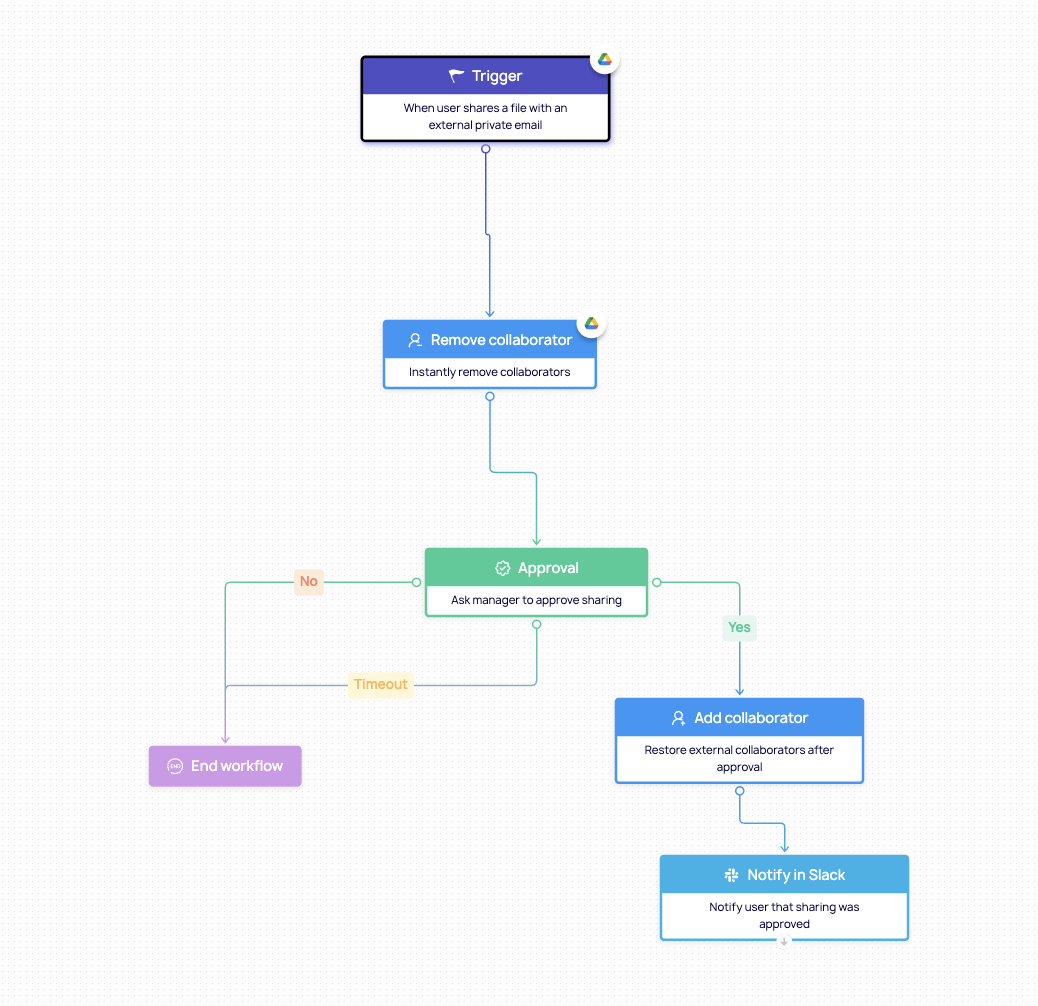
This is just one example of DoControl workflows. These workflows can be created for virtually any scenario you could think of when it comes to protecting your SaaS data.
The Future of SaaS DLP: AI and What's Next
The AI revolution has changed the SaaS DLP problem in three fundamental ways — and DoControl's coverage here is deeper than any competitor in this space.
1) AI tools are now first-class data access vectors.
When an employee connects Gemini, Copilot, Glean, or a custom GPT to their Google Drive or Slack workspace, they're granting that AI read (and sometimes write) access to everything in scope.
The AI agent becomes an identity with its own permissions — and in most enterprises, those permissions are never reviewed, never revoked, and never governed.
Every AI tool connected to SaaS data needs to be treated as a third-party app: inventoried, scoped, monitored, and revoked if it exceeds its required access, and SaaS DLP monitors these AI tools as third-party identities with ongoing visibility into access and sharing activity.
2) Autonomous agents are multiplying non-human identities.
According to DoControl's 2026 NHI Report, non-human identities now outnumber human ones in most enterprise SaaS environments. Each MCP server, automation workflow, and AI agent has its own access scope.
SaaS DLP in 2026 must provide a complete inventory of non-human identities and enforce least privilege for agents just as it does for humans.
3) AI is also improving DLP accuracy.
The same AI advances that created new exposure vectors are making SaaS DLP smarter. AI-powered classification understands context that regex cannot: an API key in a comment in a public GitHub repo is a critical finding; the same string in an internal test fixture is noise.
Behavioral and contextual AI builds baselines and detects anomalies that rigid rules miss entirely.
What this means for practitioners? The next generation of SaaS DLP isn't a tool you configure once — it's a continuously learning system that adapts to the changing SaaS estate, the evolving AI landscape, and the shifting behavior patterns of the workforce.
Platforms that can govern AI agents, detect NHI anomalies, and auto-remediate at scale are the ones that will remain effective in 2027 and beyond.
Conclusion
The way organizations work has changed forever - and so has the way we must protect data.
In a world powered by cloud collaboration, AI, and automation, SaaS DLP (SaaS Data Loss Prevention) has become the foundation of modern data security.
It’s not just about preventing data loss; it’s about enabling trust: trust that your information, your people, and your technology can move in a way that protects your critical SaaS data without slowing down business productivity.
{{cta-1}}
Frequently Asked Questions
What is SaaS DLP?
SaaS DLP (SaaS Data Loss Prevention) is the practice of discovering, classifying, and protecting sensitive data inside SaaS applications — like Google Workspace, Slack, Salesforce, and Microsoft 365 — by connecting directly to those apps via API and monitoring how data is shared, accessed, and moved in real time.
How is SaaS DLP different from traditional DLP?
Traditional DLP monitors data at the network perimeter or endpoint — it catches data in transit. SaaS DLP operates inside the cloud applications themselves, using native API connections to see permissions, sharing settings, OAuth integrations, and activity that never transits the network. Traditional DLP cannot see a Google Drive file shared to "anyone with the link." SaaS DLP can — and can revoke it automatically.
What types of data can SaaS DLP protect?
SaaS DLP protects PII (names, SSNs, email addresses, passport numbers), PHI (medical records, diagnoses, insurance IDs), financial data (credit card numbers, bank accounts, salary records), credentials (API keys, passwords, certificates), intellectual property (source code, trade secrets, M&A materials), and custom data types defined by your organization. Modern platforms like DoControl offer 230+ out-of-the-box classifiers powered by AI/ML.
Does SaaS DLP help with GDPR, HIPAA, and PCI DSS compliance?
Yes. SaaS DLP directly supports compliance by enforcing data minimization, limiting access to sensitive data, detecting and remediating unauthorized exposure, and providing audit-ready evidence of control effectiveness. DoControl maps findings to SOC 2, ISO 27001, HIPAA, PCI DSS, GDPR, NIST, and CIS benchmarks — so compliance teams can produce evidence on demand rather than assembling it manually before an audit.
How does SaaS DLP handle shadow IT and unauthorized apps?
SaaS DLP discovers unsanctioned apps connected via OAuth — surfacing apps employees have authorized without IT approval, including shadow AI tools. Each app is risk-scored based on its requested scopes, developer verification status, and installation pattern. Security teams can set policies to automatically revoke high-risk integrations or require approval for apps above a certain risk threshold.
Can SaaS DLP scan historical data, or only new activity?
Modern SaaS DLP platforms support both historical scanning and ongoing real-time protection. Historical scanning is critical for any new deployment — organizations typically have years of files with misconfigured permissions and sensitive data in unexpected locations. DoControl supports on-demand historical remediation of up to 1 million historical files in a single workflow, allowing security teams to clean up existing exposure before activating ongoing monitoring policies.
What is agentless SaaS DLP?
Agentless DLP means the platform operates via API connections rather than requiring software agents installed on endpoints or network infrastructure. This is the standard architecture for SaaS DLP — it enables faster deployment (minutes, not weeks), no endpoint impact, and coverage of SaaS apps that cannot be reached by an agent-based approach.
What is the difference between SaaS DLP and CASB?
CASB sits between your network and cloud services, monitoring traffic going in and out. SaaS DLP operates inside the applications using direct API connections, monitoring how data is created, stored, shared, and moved within the app. CASB sees what enters and leaves; SaaS DLP sees what happens inside. For insider oversharing, misconfigured permissions, and app-to-app exposure, SaaS DLP covers scenarios CASB cannot reach.
How does SaaS DLP handle false positives?
False positives occur when DLP flags legitimate actions because it only reads content without understanding context. Modern SaaS DLP reduces false positives by enriching event data with user context from HRIS and IdP systems — understanding who is sharing, their role, and whether the action aligns with normal business operations. An HR manager sharing an onboarding document with a new hire is legitimate. Context-aware SaaS DLP distinguishes this from the same file going to an unknown external address.
Can SaaS DLP protect against AI tools accessing sensitive data?
Yes. Modern SaaS DLP treats AI tools (Gemini, Copilot, Glean, custom GPTs, MCP servers) as third-party identities that need to be inventoried, scoped, and governed — just like any OAuth-connected app. This includes discovering which AI tools have access to which data, what actions they're taking, whether their scopes are appropriate, and revoking or limiting access when they exceed policy. AI governance is one of the fastest-growing capabilities in SaaS DLP as enterprises adopt more AI tools.
Want to Learn More?
- See a demo - click here
- Get a FREE Google Workspace Risk Assessment - click here
- See our product in action - click here